Are HY300 Projectors All the Same? An Exact-Unit Evidence Guide
No HY300 name or shell proves identical hardware. Use this listing freeze, arrival check, evidence worksheet and decision tree to compare exact units.
Commercial disclosure: This article is published on XBJ Projector, which is operated by RETRETO NEXT LIMITED and sells TURN1. RETRETO may benefit if you buy from this site. We have not physically verified a current stock unit for this guide. The same process below can lead you to not buy from XBJ, choose another seller or buy no projector at all.
No. The HY300 name alone does not prove that two projectors are the same. It does not prove that they are different, either. A shared name, rotating enclosure or similar menu is not evidence of a shared bill of materials, software identity, accessory set or support route.
Use three steps instead: freeze the listing, inspect the delivered unit without changing its return condition, then decide from dated evidence. Do not borrow a missing specification from another HY300 listing, manual, review or forum post.
A dated example shows why this matters. An internal planning snapshot frozen on 19 July 2026 describes an HY300Pro Android mini projector at £77.83. That snapshot is not a contemporaneous public seller listing, invoice, label photograph or inspected unit. The current TURN1 public product listing, captured on 9 August 2026 at 19:06 UTC, names TURN1 H723 at £46.99 including VAT. The internal snapshot and current listing differ in name and price. No order, serial, batch record or physical inspection connects them, so no specification can be transferred in either direction.
Three evidence states
Give every claim about each exact unit its own state:
- Public listing claim: a seller-controlled listing, policy page or manufacturer document states a value. This records what was claimed at the capture date; it does not prove what will be or was delivered.
- Physically verified: you observed the value on the exact delivered unit, its box, label, supplied document, accessory or normal system screen, and retained a dated record. A settings string proves only that the string appeared; it does not automatically verify a chip, panel or certification.
- Unknown: the evidence is absent, contradictory, unsafe to obtain or not tied to that exact unit. Unknown is a limit on the conclusion, not proof of a defect, deception or danger.
A comparison has only three results: match, different or unknown. Record the evidence threshold as well. A listing-claim match means two dated listings agree on the fields required for a decision. It does not equal a physically verified match, which requires those fields to be physically verified on both exact units. If either side lacks evidence at the chosen threshold, the result is unknown.
Set your buying threshold first
Do not make every unknown a reason to reject a budget projector. Decide what matters for this order before collecting evidence.
Must check for any order
- Seller identity and a working contact route.
- Exact listing URL, model or SKU, selected variation and capture date.
- Total price, including VAT, delivery and any stated extra charges.
- Promised box contents, especially the projector, original power equipment and control method.
- Published return contact process and the policy captured on the order date.
Must-have for your use
Choose only the fields that can make the projector unsuitable for your task: a required input, native-resolution claim, supplied remote, original power arrangement, a specific streaming claim, placement feature or another requirement you would not buy without. If a must-have remains unknown because the seller will not tie an answer to the exact listing, pause, choose another listing or do not buy. A safety-critical identity or condition unknown also triggers a pause.
Advanced identity boundary
Board revision, component bill of materials, panel part number, firmware checksum and similar service-level fields matter for firmware, repair or part matching. They are not default homework for an ordinary purchase and should not invite dismantling. Record them as unknown unless a responsible seller, manufacturer or existing service document ties them to the exact model, batch or serial.
Identity is more than a model name
Commercial identity covers the seller, listing, SKU, price, warranty and return route. Physical identity covers box and unit labels, serial or batch, enclosure, ports and supplied accessories. Hardware identity includes the SoC, board, panel, memory and storage. Software identity includes the operating-system build, security patch, firmware and update channel.
A match in one layer cannot repair a gap in another. The same shell proves visual similarity only. The same Android wording does not prove the same board. The same stated resolution does not identify the panel. When recording listing claims, supports 4K versus native resolution helps separate input compatibility from a claimed or physically verified panel resolution; it does not establish either field for an exact unit. A matching 12-month duration does not establish the same product, seller, coverage or remedy.
The current seller-controlled product information says HY300Pro imagery does not represent the current TURN1 model and says packaging, remote, adaptor and documentation should be checked against the UK stock batch. That is a useful disclosure, but it is not a public batch-to-serial map or physical verification.
Before checkout: freeze the listing
Listings can change after purchase, and one page can contain inconsistent images or specifications. Save a dated record before paying:
- Save the full URL, listing ID, seller SKU, selected variation, date, time and displayed total price.
- Record the seller display name, stated legal identity, contact route, seller location and dispatch party.
- Capture only the panels relevant to your must-haves, including model, manufacturer, system, memory, storage, native-resolution wording, ports or power.
- Save images of the case, labels, port layout, plug, adaptor, remote, packaging and promised contents.
- Preserve the warranty duration, stated exclusions, return window, return-cost wording and method for obtaining a return destination.
- Copy app, streaming, update, safety-marking and certification wording exactly. Do not improve ambiguous copy in your notes.
- Ask about missing must-haves in writing and retain the reply with the order record.
The Office for Product Safety and Standards’ general guidance advises online buyers to check seller and manufacturer details, instructions and safety markings, and to compare the received product with its online pictures and description. It does not identify or certify an HY300, HY300Pro or TURN1 projector.
An unanswered non-critical question can stay recorded as unknown. An unanswered must-have or safety-critical question should stop the purchase until you have enough evidence. A polished image, familiar suffix or higher price does not supply a missing identity.
On arrival: preserve the evidence window
Inspect before normal use. Keep all packaging, inserts and labels until the delivery has been compared with the frozen listing. Before identity checks are complete, avoid signing into personal accounts, updating or flashing software, removing labels, discarding packaging or doing anything that would obviously alter the product’s return condition.
- Photograph the sealed parcel and shipping label. Redact your name, address and order number from anything shared publicly.
- Photograph every side of the retail box and projector, including model, serial, batch, manufacturer or importer details, warnings and conformity markings.
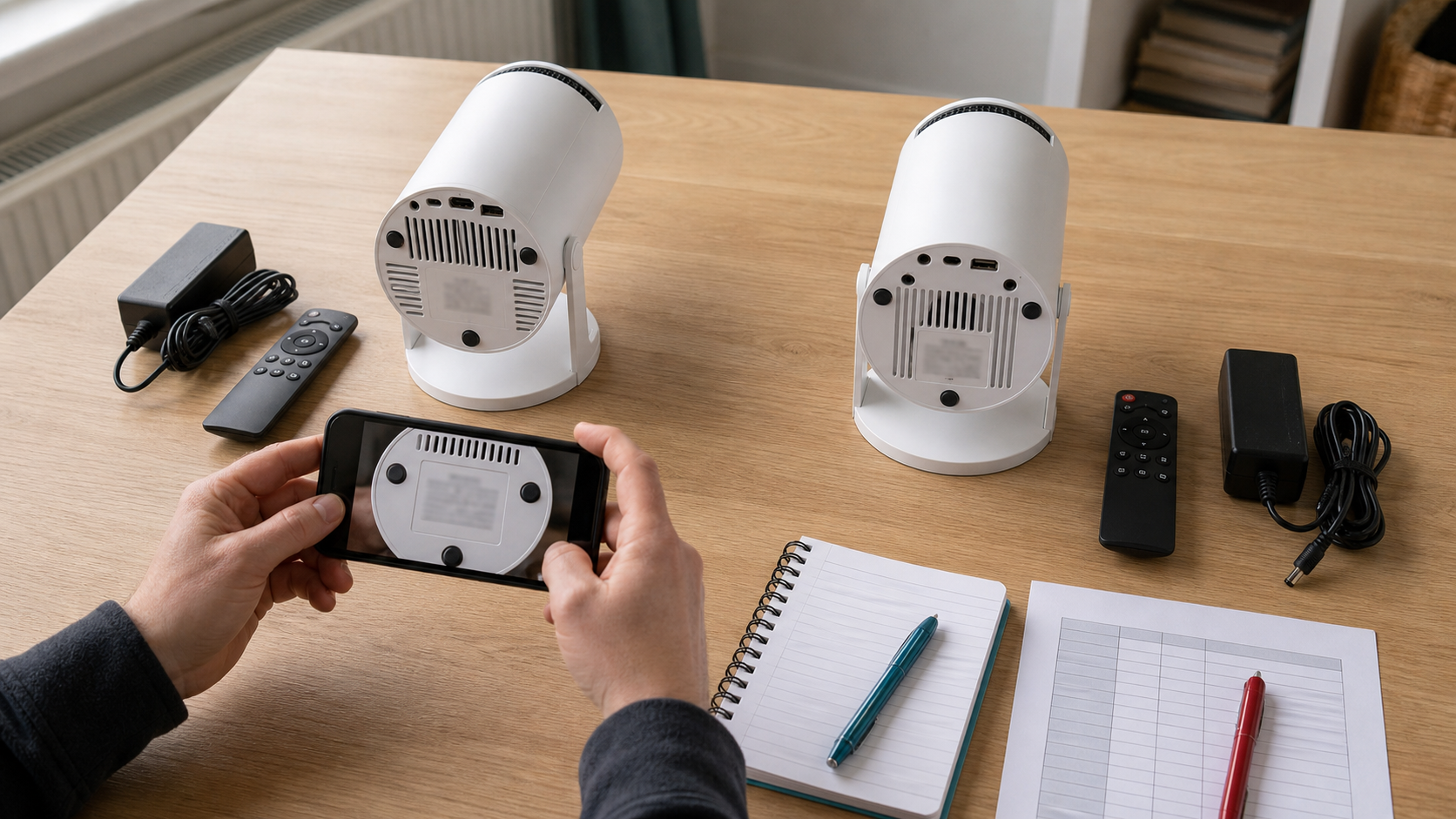
- Lay out the manual, remote, adaptor, cables and other supplied items. Take an overview plus readable close-ups of labels.
- Compare the enclosure, port positions, printed labels, accessories and instructions with the saved listing.
- Before power-up, check for shipping damage, loose parts, scorching, damaged cables, unclear instructions or supplied power equipment that cannot be tied to the order.
- If there is no identity, condition or safety concern, follow only the supplied instructions and capture normal About, Device Information, build, storage and update-source screens.
- Record differences immediately. Keep the seller conversation, eligibility response, return reference and order-specific destination if you contact support.
Use this action table; it is an evidence and escalation guide, not a promise of eligibility, refund or another legal result.
| What you find | Action |
|---|---|
| Wrong model or seller, missing promised accessory, damaged unit, abnormal adaptor identity or condition, burning smell, smoke, sparking, unusual heat or unstable power | Stop and retain evidence. Disconnect safely where appropriate, preserve packaging and labels, and contact the seller through the order route. |
| A must-have is missing or cannot be tied to the exact unit, but there is no sign of a safety problem | Pause and ask in writing. Avoid further setup or changes while the seller confirms the exact listing, batch, accessory or policy. |
| A packaging or minor difference was disclosed before purchase, has no safety implication and does not affect a must-have | Record and decide. Keep the evidence and decide for yourself whether to accept it under the order’s applicable terms. |
Do not open the case, enter hidden service functions, run stress tests, substitute power equipment or flash software to identify a returnable unit. This workflow is not an electrical inspection.
The exact-unit worksheet
Use one evidence card per listing or delivered unit. Repeat a claim block for every field that matters; never give a whole product one blended status.
Single-unit evidence card
- Unit record: A or B; seller; order/listing ID; model/SKU/variation.
- Field and purpose: for example, supplied adaptor identity; required for safe initial setup.
- Claim or observation: copy the exact wording or describe only what is visible.
- Evidence state: public listing claim, physically verified or unknown.
- Captured: date and time.
- Source reference: URL, listing PDF page, box photo, unit-label photo, normal system screen or seller message.
- Must-have for my use: yes or no.
- Result: match, different or unknown at the threshold chosen before comparison.
- Next action: buy or keep; ask and hold; or return or walk away. Record the reason and the order-specific route where relevant.
- Privacy check: redact serials, addresses, account emails, Wi-Fi identifiers, QR tokens and order numbers from public copies.
Example: Listing A claims a supplied UK-compatible adaptor on 2026-08-09 and links to the seller page. On arrival, the adaptor label cannot be tied to the unit or order. Keep the listing claim and arrival observation as separate records. If the original supplied power arrangement is a must-have, the exact-unit evidence state is unknown: pause power-up and ask that order’s seller in writing.
After completing the two single-unit records, use a compact comparison table. Each A/B cell must cite its own status, date and source. Choose the threshold before comparing.
| Decision field and threshold | Unit A evidence | Unit B evidence | Result | Next action |
|---|---|---|---|---|
| Example: supplied remote, physically verified | Photo A-04; physically verified; 10 Aug 2026 | Photo B-03; physically verified; 10 Aug 2026 | match / different / unknown | buy or keep / ask and hold / return or walk away |
Copy the example row for each decision field. Use match only when both sides meet the stated threshold and agree. Use different when both sides meet the threshold and conflict. Use unknown when either side lacks evidence at that threshold. For a must-have, different means walk away before purchase or hold further setup and use the order’s eligible return route after delivery; unknown means ask in writing and hold. A non-critical unknown can be recorded and accepted. Matching all must-haves only clears this evidence gate: price, condition and the rest of the buying decision still apply. A listing-claim match remains a listing-claim match; it never becomes a physically verified match merely because the wording agrees. Do not calculate a sameness score: several cosmetic matches cannot override one decision-critical conflict.
Decision tree: match, ask, return or walk away
Before purchase: Can you identify the seller, exact listing, variation, total price, promised contents and usable return contact route? If not, ask in writing. Then check only your must-haves. If any seller, including XBJ, cannot tie a must-have answer to that listing, the result is unknown: pause, choose another listing or do not buy. Non-critical unknowns can be recorded without automatically rejecting the product.
After delivery: Do the box, projector, labels, original adaptor, remote, instructions and normal system screens meet the evidence threshold for your must-haves? A documented conflict is different. Missing evidence is unknown. Agreement is physically verified only for the observed fields, not for hidden components or untested capabilities. Use the arrival action table before further setup.
For firmware: Record the unit and box labels, exact order model or batch, and the normal About, build, firmware and update-source screens. Send the evidence privately to the original seller or responsible manufacturer and require written confirmation that its update source explicitly covers that exact build and board identity. If the reply is only “for HY300,” or the board/build cannot be tied to the file, stop. This article provides no firmware file, procedure, recovery sequence or cross-model advice.
For a remote: Photograph the original remote’s front, rear and battery compartment, any label, the unit and box labels, and the order model or batch. Ask the original seller or responsible manufacturer to confirm in writing that a proposed remote covers that exact unit and control method. Do not rely on matching shape or a generic “HY300” description. No replacement remote is recommended here.
For a power adaptor: Photograph every face of the original adaptor label, plug, cable and connector, plus the unit label and order record. Send those records privately to the original seller or responsible manufacturer and request written exact-order or exact-unit confirmation. Do not post personal order details publicly, and do not use a substitute merely because its connector fits. This article gives no electrical specification, substitution or compatibility recommendation.
For streaming: Android, an app icon or seller wording does not establish certification or stable playback. For the current TURN1 listing, the seller says it does not claim Netflix certification and that its reviewed documents do not identify such certification. That is a first-party statement about reviewed material, not proof of certified or uncertified status. Exact-unit status remains unknown without device-specific evidence.
For a return or warranty: Use the seller, dated policy and authorisation attached to the actual order. XBJ’s seller-controlled returns policy publishes a 30-day process, but eligibility must be confirmed for the order, change-of-mind return postage is normally paid by the consumer, and support supplies the correct return reference and address. The advertised 12 months is only the seller’s public warranty duration; complete coverage, exclusions, handling route and timing remain unknown. Stop further testing and contact the seller when a material description conflict, suspect supplied equipment or safety-critical unknown appears; use a return or warranty route only if it is available and the order is eligible. Do not substitute a registered office for an authorised return address.
After the exact unit and seller route have been recorded, the HY300-class problems and fixes guide can help with symptom triage and limited external checks only. Its class-level causes, remedies, warranty wording and compatibility references are not evidence about an exact unit.
Applying the same standard to XBJ
On 9 August 2026, XBJ’s seller-controlled pages publicly claimed TURN1 H723, SKU TURN1-H723-WH-GY, £46.99 including VAT, Allwinner H723, Android 14, 1GB RAM, 8GB storage, native 1280 x 720, one HDMI port, one USB port and 42W total power. These are dated listing claims, not measurements or observations of current stock.
XBJ names Shenzhen JUNUO Electronics as manufacturer and supply source, while its supply-chain disclosure says no separate authorised-dealer certificate was issued and supporting communication is held privately. That relationship is therefore a commercial first-party claim, not independently verified exact-unit provenance.
Companies House independently records RETRETO NEXT LIMITED, company 15166864, as active and shows the same registered office. This confirms the legal entity and office only. It does not authenticate a projector, verify stock or the claimed supply relationship, prove warranty performance or make the registered office a return address.
XBJ also says packaging, app availability and minor specifications may vary by batch or software update. Without a current stock unit, batch-to-public-specification map, readable unit and accessory labels, normal system screens and order-level documents, the corresponding exact-unit fields remain unknown.
The internal planning snapshot frozen on 19 July 2026, which describes an HY300Pro at £77.83, remains separate from this 9 August 2026 current TURN1 public listing. The snapshot was not a public seller listing or inspected unit, and none of its specifications transfer to TURN1. The current TURN1 can still fail your decision if a must-have or safety-critical field remains unknown. This article does not recommend buying it or any other projector.
Frequently asked questions
Does the HY300 Pro name guarantee a newer or better projector?
No. The evidence reviewed does not establish the suffix as a controlled specification. Compare the seller, exact listing, unit and box labels, relevant system evidence, accessories and support route instead.
Can two matching listings still deliver different units?
Yes, that remains possible when listing claims are not tied to a stock batch or serial range. Freeze each listing, then compare the delivered box, unit, accessories and normal system screens. A listing-claim match is not a physically verified match.
Is every unknown a reason not to buy?
No. Record non-critical unknowns. Pause or choose another listing when the unknown is a must-have for your use, prevents seller/order identification or is safety-critical. Advanced board, panel and checksum fields are normally relevant only to repair, firmware or parts decisions.
Can I use firmware, a remote or an adaptor advertised for HY300?
The family name alone is insufficient. Collect the exact identity records described above and seek written confirmation from the original seller or responsible manufacturer. If the answer cannot be tied to the exact unit, do not flash, connect or buy the proposed item.
When should I stop testing and contact the seller?
Stop for a model or seller conflict, a missing promised accessory, suspect original power equipment, damage, smoke, sparking, unusual heat, burning smell or unstable power. Preserve the order record, packaging and labels; avoid further setup while using the route for the actual order.
Evidence limits appendix: 18 exact-unit unknowns
These 18 items are the complete unknown boundary between the internal planning snapshot frozen on 19 July 2026, which describes an HY300Pro at £77.83 but is not a public seller listing or inspected unit, and the 9 August 2026 current TURN1 public listing. They are grouped by how evidence could be observed and when it is useful. They are not 18 alleged defects and are not all required for an ordinary purchase.
Observable from packaging, accessories or normal screens
- The model label and serial number on an actual current XBJ-supplied unit and its box.
- The Android build number, security patch level and system-image identity.
- The physically installed RAM and storage capacities and component identities.
- The exact physical port layout, labels, HDMI version and USB electrical or data capabilities.
- The supplied adaptor brand, model, input and output ratings, polarity, connector dimensions and conformity markings.
- The supplied remote model, protocol, code set, receiver type and compatibility.
- Any Netflix or other streaming-service certification identifier, DRM level or stable playback capability.
- The exact box contents, printed manual revision and accessory part numbers for the current batch.
- The safety and conformity markings, manufacturer or importer address and warnings on the exact unit and packaging.
These fields can sometimes be partly recorded without dismantling, but a visible label or screen still proves only what it shows. Do not perform electrical tests, hidden-menu access or teardown to fill a blank.
Requires seller, manufacturer, order or service records
- Whether the frozen HY300Pro corresponds to any XBJ order, SKU, supplier, serial range or stock batch.
- The exact-unit manufacturer shown on the unit, packaging, declaration or invoice chain.
- The firmware version, checksum, OTA channel and board-specific compatibility.
- The current stock batch number, production date and mapping from batch to public specification.
- The UK return address for a specific order.
- The complete warranty coverage, exclusions, repair or replacement route and remedy timing beyond the public 12-month duration.
Ask the responsible party to tie an answer to the listing, order, batch or serial. Keep order numbers and full serials in private support messages rather than public worksheets.
Advanced identity for firmware, repair or parts decisions
- The installed SoC and its package marking.
- The PCB identifier, board revision and component bill of materials.
- The native panel manufacturer, part number, revision and physically verified pixel matrix.
These are advanced identity boundaries, not a request for consumer teardown. Leave them unknown unless existing manufacturer or qualified service documentation ties them to the exact model, batch or serial.